


Google Photos isn't new to showing its users photos from their past at regular intervals. Photos from the previous year or a certain mem...
Google Photos isn't new to showing its users photos from their past at regular intervals. Photos from the previous year or a certain memorable occasion have often appeared as cards in the Assistant section of the app. But Google is changing that now to keep up with the times. Following a story-style approach that's seen in apps like Facebook and Instagram, Photos will now present older photos as brief full-screen previews in a new feature called Memories.
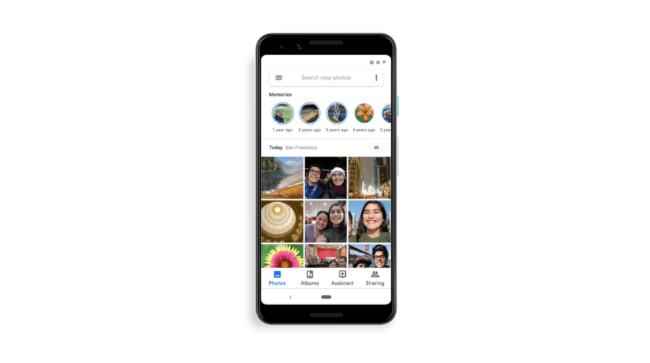
Google Photos' new Memories feature works almost exactly the way stories do in social media apps such as Facebook and Instagram. Memories puts tiny icons on the home screen of the Photos app so it's easy to revisit old photos. Clicking on these icons opens up a short full-screen preview of the photos. Inside each ‘memory’, there's an option to share the original photo with other users. Of course, users can always go back to that time and view all the photos from around that event or period.
According to Google, Photos uses machine learning to pick the right photos from the past so the user doesn't waste time viewing duplicates or badly taken shots. Stating why the company chose to go with this story-style format, Shimrit Ben-Yair, Director of Google Photos writes in a recent blog post, “You lose the warm and fuzzy nostalgic feeling when you have to scroll through hundreds of duplicate photos, so we’re putting your memories front and center in Google Photos.”

Acknowledging the fact that this story-like feature might be unsettling for nonusers of social media apps, Ben-Yair explains, “While you might recognize this stories format from social media, these memories are your personal media, privately presented to you so you can sit back and enjoy some of your best moments.” Users who still prefer not to be presented with photos from the past can always head to Settings > Memories in the app to turn the feature off. User who don't yet see the new feature in their Google Photos app can expect to have it in the coming days.

from Latest Technology News https://ift.tt/2I7MUO1


COMMENTS