Google quietly adds UPI payment method in Google Play Store

SHARE:

Since its inception in 2016, UPI (Unified Payments Interface) has gradually been adopted by many Indian apps and services as one of the appr...

Since its inception in 2016, UPI (Unified Payments Interface) has gradually been adopted by many Indian apps and services as one of the approved payment methods, including Google's own digital payment app Google Pay (previously Google Tez). Joining the game somewhat late is the Google Play Store as apps and games on the popular app store for Android devices can now be purchased through UPI. It appears that Google has added support for UPI on Play Store without publishing so much as a short blog post, earlier this weekend.

To get started with UPI payments on Google Play Store, you need not install or download anything special. In the Play Store app, swipe right from the extreme edge on the left to bring up the hamburger menu. Find the list item ‘Payment methods’ and select it. If the Play Store app on your Android device is version 16.3.36 or later, you should see the option to “Add bank account with BHIM UPI ID” under Add payment method.
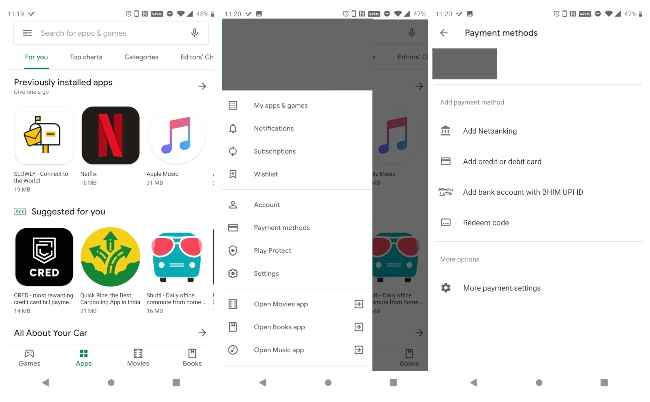
Select the option to enter your UPI ID, which is usually in the following format: username@bankname. It is also known as VPA (Virtual Payment Address). If you've already got a UPI ID generated by your Google Pay app, then the Google Account linked to it must be the one you use in Google Play Store for UPI registration. Otherwise, expect to see an error pop up. Once you have verified your UPI ID, you should be able to use it for future payments within the Google Play Store. This includes apps, games, and subscriptions.

Started in April 2016 and revised a year ago by the National Payments Corporation of India, UPI is an instant payment system for inter-bank transactions. As of March 2019, 142 banks across the country support UPI as an approved payment method. Both iOS and Android devices have numerous digital payment apps that support UPI, such as BHIM, PhonePe, Paytm, and Google Pay. You can learn more about UPI here.


from Latest Technology News https://ift.tt/2kbGZ1X

COMMENTS

Name

7,1,Airtel,1,Andriod,1,Android,4,Android Q,1,apex,1,Apple,7,Apps,1,Asus Rog,1,Black Shark 2,2,Boeing 737 MAX,1,Bsnl,2,camera,2,CPU,3,Donald Trump,1,Earphone,1,Facebook,5,Fan,1,Fitbit,1,foldable Phone,2,Fortnite,1,Galaxy A40,1,Galaxy s10,1,Galaxy s10e,1,Games,10,gaming,1,Google,6,Google Pixel 2,1,Honor 10i,1,Huawe,1,Huawei,6,Huawei GT,1,IBM,1,Instagram,2,Internet,2,ios,2,iPad,2,iphone,2,Israel,1,jiomart,1,Laptop,1,Leica Q2,1,M20,1,mac,1,MacOS,1,Mi 9,1,Mi A2,1,Mi LED TV,1,MicroSoft,3,mobile,1,Moon,2,Mozilla,1,Nasa,2,News,1,Nokia,4,Nokia 62,1,Nvidias,1,OnePlus,4,Oppo,5,P30,3,Pixel,1,Poco F1,1,Pubg,12,Qualcomm,2,Redmi 3,1,Redmi 6 Pro,1,Redmi 7,1,Redmi Note 7,1,reliance,1,Reno,1,samsung,11,Skype,1,SmartPhone,56,Social,5,Spotify,1,Tech,35,Telecom,3,Touchpad,1,Tournament,1,TV,1,Twitter,1,Vivo,2,Watch,2,WhatsApp,1,Xbox,1,Xiaomi,16,y9li,1,
ltr
item
Genius Baba: Google quietly adds UPI payment method in Google Play Store
Google quietly adds UPI payment method in Google Play Store
https://static.digit.in/default/3ee66dab7a77d13f8a7626cfb2033abdcd7067cf.jpeg
Genius Baba
https://geniusbabaa.blogspot.com/2019/09/google-quietly-adds-upi-payment-method.html
https://geniusbabaa.blogspot.com/
https://geniusbabaa.blogspot.com/2019/09/google-quietly-adds-upi-payment-method.html
true
7104319406113350277
UTF-8
Loaded All Posts Not found any posts VIEW ALL Readmore Reply Cancel reply Delete By Home PAGES POSTS View All RECOMMENDED FOR YOU LABEL ARCHIVE SEARCH ALL POSTS Not found any post match with your request Back Home Sunday Monday Tuesday Wednesday Thursday Friday Saturday Sun Mon Tue Wed Thu Fri Sat January February March April May June July August September October November December Jan Feb Mar Apr May Jun Jul Aug Sep Oct Nov Dec just now 1 minute ago $$1$$ minutes ago 1 hour ago $$1$$ hours ago Yesterday $$1$$ days ago $$1$$ weeks ago more than 5 weeks ago Followers Follow THIS PREMIUM CONTENT IS LOCKED STEP 1: Share. STEP 2: Click the link you shared to unlock Copy All Code Select All Code All codes were copied to your clipboard Can not copy the codes / texts, please press [CTRL]+[C] (or CMD+C with Mac) to copy