You can now remote play your Xbox games on your iPhone

SHARE:

Playing games on your TV via your Xbox is an immersive experience. But if there is only one TV in your house, then a lot of precious gaming ...

Playing games on your TV via your Xbox is an immersive experience. But if there is only one TV in your house, then a lot of precious gaming time is lost. Thankfully, with the update to the Xbox app, you can now play your Xbox games on your iPhone. The ability to do this on your Android phone came in late 2019 and it is now available for the iPhone via the Xbox App. 


It's official. The new Xbox App is ready for download. You can tell it's official because we are tweeting about it: https://t.co/cB1BUaWvVv pic.twitter.com/JoFAUvDJVp

— Xbox (@Xbox) October 19, 2020


Streaming games from your Xbox to your iPhone

To stream games from your Xbox to your iPhone, you need to ensure the following. 

Ensure your iPhone is on iOS version 10 or greater and supports Bluetooth version 4.0+ Game streaming will work on the Xbox One consoles and the upcoming Series S/X. You will also need an Xbox One Bluetooth controller.  Most importantly, you will need 5GHz Wi-Fi or mobile data connection with 10 Mbps down. 

You can follow the step by step guide on the app to enable the feature. Note that the Xbox will check your network infrastructure to let you know if remote play will work or not. In our case, it didn’t. You can check out the image below. 
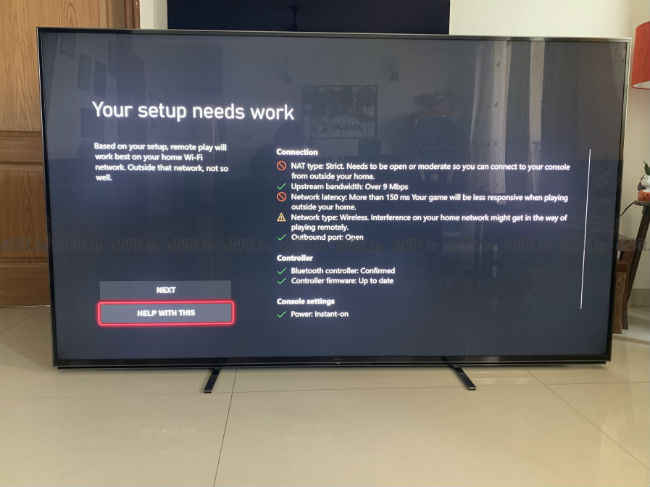
Xbox Remote Play mot not work on your setup

If you are a PS4 user then know that remote play has been available on the iPhone app for a year now. But unlike Microsoft who have integrated it into the Xbox app, for PlayStation you need a separate remote play app. The app has reportedly been updated to work with the PS5 as well.

In other console gaming news, if you are looking to pick up an Xbox Series S/X you can learn about the India price and release date here. If you are looking forward to the PS5, you can check out hoe the India price compares to the international price here.


from Latest Technology News https://ift.tt/35yjvaX

COMMENTS

Name

7,1,Airtel,1,Andriod,1,Android,4,Android Q,1,apex,1,Apple,7,Apps,1,Asus Rog,1,Black Shark 2,2,Boeing 737 MAX,1,Bsnl,2,camera,2,CPU,3,Donald Trump,1,Earphone,1,Facebook,5,Fan,1,Fitbit,1,foldable Phone,2,Fortnite,1,Galaxy A40,1,Galaxy s10,1,Galaxy s10e,1,Games,10,gaming,1,Google,6,Google Pixel 2,1,Honor 10i,1,Huawe,1,Huawei,6,Huawei GT,1,IBM,1,Instagram,2,Internet,2,ios,2,iPad,2,iphone,2,Israel,1,jiomart,1,Laptop,1,Leica Q2,1,M20,1,mac,1,MacOS,1,Mi 9,1,Mi A2,1,Mi LED TV,1,MicroSoft,3,mobile,1,Moon,2,Mozilla,1,Nasa,2,News,1,Nokia,4,Nokia 62,1,Nvidias,1,OnePlus,4,Oppo,5,P30,3,Pixel,1,Poco F1,1,Pubg,12,Qualcomm,2,Redmi 3,1,Redmi 6 Pro,1,Redmi 7,1,Redmi Note 7,1,reliance,1,Reno,1,samsung,11,Skype,1,SmartPhone,56,Social,5,Spotify,1,Tech,35,Telecom,3,Touchpad,1,Tournament,1,TV,1,Twitter,1,Vivo,2,Watch,2,WhatsApp,1,Xbox,1,Xiaomi,16,y9li,1,
ltr
item
Genius Baba: You can now remote play your Xbox games on your iPhone
You can now remote play your Xbox games on your iPhone
https://static.digit.in/default/0208edc31b48e9669e9eafca504e3b03c6c37d77.jpeg
https://i.ytimg.com/vi/FsqT72Efcv4/default.jpg
Genius Baba
https://geniusbabaa.blogspot.com/2020/10/you-can-now-remote-play-your-xbox-games.html
https://geniusbabaa.blogspot.com/
https://geniusbabaa.blogspot.com/2020/10/you-can-now-remote-play-your-xbox-games.html
true
7104319406113350277
UTF-8
Loaded All Posts Not found any posts VIEW ALL Readmore Reply Cancel reply Delete By Home PAGES POSTS View All RECOMMENDED FOR YOU LABEL ARCHIVE SEARCH ALL POSTS Not found any post match with your request Back Home Sunday Monday Tuesday Wednesday Thursday Friday Saturday Sun Mon Tue Wed Thu Fri Sat January February March April May June July August September October November December Jan Feb Mar Apr May Jun Jul Aug Sep Oct Nov Dec just now 1 minute ago $$1$$ minutes ago 1 hour ago $$1$$ hours ago Yesterday $$1$$ days ago $$1$$ weeks ago more than 5 weeks ago Followers Follow THIS PREMIUM CONTENT IS LOCKED STEP 1: Share. STEP 2: Click the link you shared to unlock Copy All Code Select All Code All codes were copied to your clipboard Can not copy the codes / texts, please press [CTRL]+[C] (or CMD+C with Mac) to copy