Microsoft has turned off File Explorer Ads and heres how you can disable other Windows Ads

SHARE:

For operating system (OS) companies like Microsoft, built-in advertising could be a direct revenue source or a way to promote their products...

For operating system (OS) companies like Microsoft, built-in advertising could be a direct revenue source or a way to promote their products. Windows OS is already known to have ads in various parts of the user interface. They are mostly removable using simple toggles. However, one area which didn’t have ads till now was File Explorer, and much to our dismay, it may too have ads in the future.

Recently, a Twitter user named @flobo09 shared a screenshot showing a Microsoft Editor promo ad in the Windows File Explorer. The tech Twitterati took note of it and openly showed its disapproval. Listening to the growing commotion, Microsoft released a press statement through The Verge saying, “This was an experimental banner that was not intended to be published externally and was turned off.”
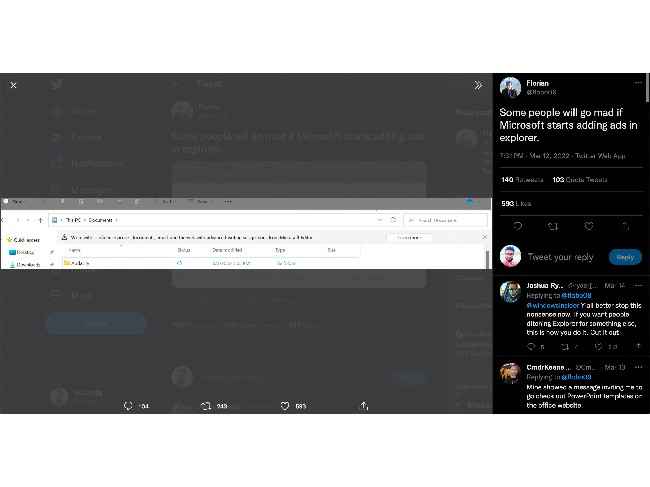
Microsoft Windows Ads in File Explorer

Now, nowhere does it say that Microsoft won’t turn on those ads again, and more importantly, it doesn’t seem to have the intention to keep Windows 11 ads at bay.  

So, we may have to take things into our own hands. Let’s do that.

How to disable Microsoft Ads on Windows
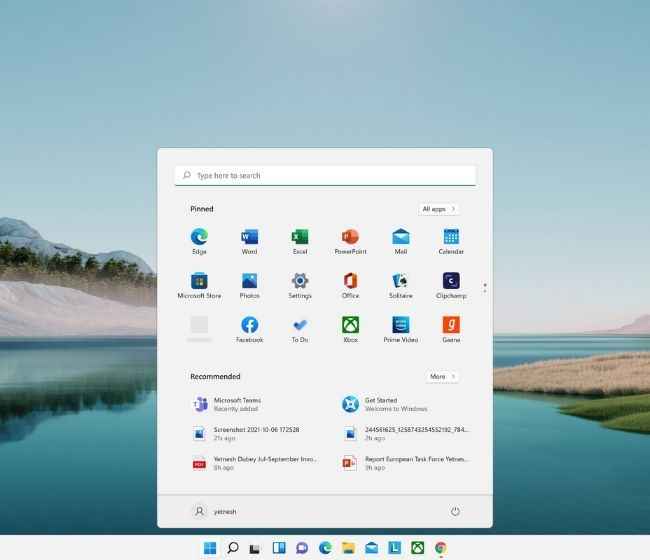
Windows 11 start menu

Remove promoted apps on the Windows Start Menu individually by right-clicking and tapping the Unpin/Uninstall option. Get rid of Windows Lockscreen ads by unticking the ‘Get fun facts, tips, tricks, and more on your lock screen’ option within Settings > Personalization > Lockscreen. Disable “suggestions” and “tips” (that you may find unnecessary) by unchecking ‘Offer suggestions on how I can set up my device’ and ‘Get tips and suggestions when I use Windows’ options within Settings > System > Notifications.  Even the ads that may appear on the Settings app can be toggled off by unticking the ‘Show me suggested content in the Settings app’ within Settings > Privacy & Security > General. Disable permissions to Microsoft from accessing your Diagnostic data by switching off the ‘Let Microsoft use your diagnostic data, excluding info about websites you browse, to enhance your product experiences with personalized tips, ads, and recommendations.’ option within Settings > Privacy & Security > Diagnostic & Feedback > Tailored experiences. And at last, if you don’t want Microsoft creating a personalized ad profile of you, you can deny the ‘Let apps show me personalized ads by using my advertising ID option’ within Settings > Privacy & Security > General.

These remove or deny Microsoft’s permission to use various ad spots across their platform. So, you may follow the above steps and have a largely ad-free Windows experience.

For more information, news, reviews, buying guides, feature stories, and everything else tech-related, keep reading Digit.in.


from Software News https://ift.tt/fAYUDKT

COMMENTS

Name

7,1,Airtel,1,Andriod,1,Android,4,Android Q,1,apex,1,Apple,7,Apps,1,Asus Rog,1,Black Shark 2,2,Boeing 737 MAX,1,Bsnl,2,camera,2,CPU,3,Donald Trump,1,Earphone,1,Facebook,5,Fan,1,Fitbit,1,foldable Phone,2,Fortnite,1,Galaxy A40,1,Galaxy s10,1,Galaxy s10e,1,Games,10,gaming,1,Google,6,Google Pixel 2,1,Honor 10i,1,Huawe,1,Huawei,6,Huawei GT,1,IBM,1,Instagram,2,Internet,2,ios,2,iPad,2,iphone,2,Israel,1,jiomart,1,Laptop,1,Leica Q2,1,M20,1,mac,1,MacOS,1,Mi 9,1,Mi A2,1,Mi LED TV,1,MicroSoft,3,mobile,1,Moon,2,Mozilla,1,Nasa,2,News,1,Nokia,4,Nokia 62,1,Nvidias,1,OnePlus,4,Oppo,5,P30,3,Pixel,1,Poco F1,1,Pubg,12,Qualcomm,2,Redmi 3,1,Redmi 6 Pro,1,Redmi 7,1,Redmi Note 7,1,reliance,1,Reno,1,samsung,11,Skype,1,SmartPhone,56,Social,5,Spotify,1,Tech,35,Telecom,3,Touchpad,1,Tournament,1,TV,1,Twitter,1,Vivo,2,Watch,2,WhatsApp,1,Xbox,1,Xiaomi,16,y9li,1,
ltr
item
Genius Baba: Microsoft has turned off File Explorer Ads and heres how you can disable other Windows Ads
Microsoft has turned off File Explorer Ads and heres how you can disable other Windows Ads
https://static.digit.in/default/023e95ef61e3e54dd66646260e1499adfea0bb7d.jpeg
https://i.ytimg.com/vi/eNGttjZSuMI/default.jpg
Genius Baba
https://geniusbabaa.blogspot.com/2022/03/microsoft-has-turned-off-file-explorer.html
https://geniusbabaa.blogspot.com/
https://geniusbabaa.blogspot.com/2022/03/microsoft-has-turned-off-file-explorer.html
true
7104319406113350277
UTF-8
Loaded All Posts Not found any posts VIEW ALL Readmore Reply Cancel reply Delete By Home PAGES POSTS View All RECOMMENDED FOR YOU LABEL ARCHIVE SEARCH ALL POSTS Not found any post match with your request Back Home Sunday Monday Tuesday Wednesday Thursday Friday Saturday Sun Mon Tue Wed Thu Fri Sat January February March April May June July August September October November December Jan Feb Mar Apr May Jun Jul Aug Sep Oct Nov Dec just now 1 minute ago $$1$$ minutes ago 1 hour ago $$1$$ hours ago Yesterday $$1$$ days ago $$1$$ weeks ago more than 5 weeks ago Followers Follow THIS PREMIUM CONTENT IS LOCKED STEP 1: Share. STEP 2: Click the link you shared to unlock Copy All Code Select All Code All codes were copied to your clipboard Can not copy the codes / texts, please press [CTRL]+[C] (or CMD+C with Mac) to copy