New Android contact sync policy could affect you, but theres a simple fix

SHARE:

Google has changed the Android contact sync policy which could prove critical for you, especially if you aren’t aware of it. It changes the ...

Google has changed the Android contact sync policy which could prove critical for you, especially if you aren’t aware of it. It changes the way Android used to handle your backed-up contacts on the cloud. Your Android contacts will disappear from your phone if you don’t pay heed. 

Here’s what has changed:

New Android contacts sync policy

Earlier when you sign in to your Android device with your Google account, the contacts backed up to that account get automatically synced to the new device. All your entries in the Google Contacts appear in the contacts list on the new phone. Also even if you don’t have contacts sync enabled, the contacts would still appear on the device. 

That has changed. 

As per the recent May 2023 Google Play System changelog, "Turning off Google Contacts sync will now remove the previously synced contacts from your Android phone." 

This will be in effect on all Android phones with the Google Play Services v23.20 update.

Now, by removal, Google means the contacts will vanish from the device, not from the cloud. So, as long as you have them in contacts.google.com, you need not worry as you can turn on Google Contacts sync on the device and the list gets populated quickly. Easy peasy! 

However, technically adept regular folks, say your parents or elderly member in your family may not know how to turn on Google Contacts Sync if they ever accidentally toggle it off. When they see the contacts list has gone empty, they may panic. 

So, here’s what you got to do to save your online backed-up contacts:
Google

1. Go to Settings on your Android phone. 

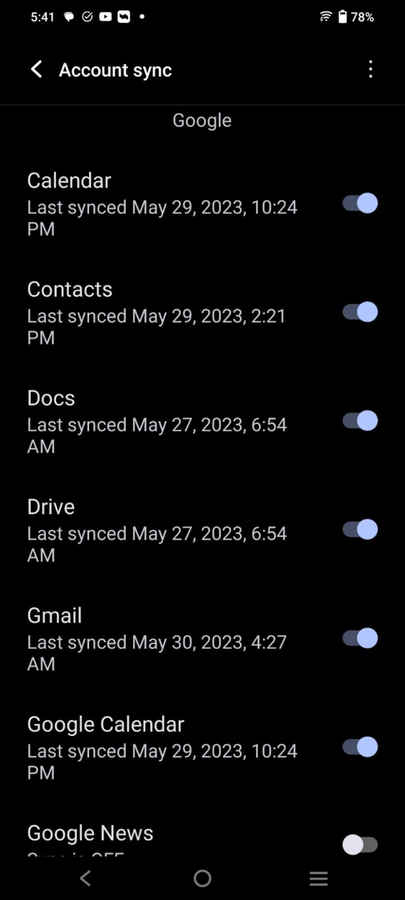
2. Then within Passwords & Accounts (Or simply Accounts in some devices), click on your Google account and then Account Sync.

3. You will see a list of things being synced or that can be synced to your Google account. Ensure the Contacts option is enabled or that the toggle next to it is turned on. 

This will bring back your contacts on the device. That’s all.


from Software News https://ift.tt/7TOgF1J

COMMENTS

Name

7,1,Airtel,1,Andriod,1,Android,4,Android Q,1,apex,1,Apple,7,Apps,1,Asus Rog,1,Black Shark 2,2,Boeing 737 MAX,1,Bsnl,2,camera,2,CPU,3,Donald Trump,1,Earphone,1,Facebook,5,Fan,1,Fitbit,1,foldable Phone,2,Fortnite,1,Galaxy A40,1,Galaxy s10,1,Galaxy s10e,1,Games,10,gaming,1,Google,6,Google Pixel 2,1,Honor 10i,1,Huawe,1,Huawei,6,Huawei GT,1,IBM,1,Instagram,2,Internet,2,ios,2,iPad,2,iphone,2,Israel,1,jiomart,1,Laptop,1,Leica Q2,1,M20,1,mac,1,MacOS,1,Mi 9,1,Mi A2,1,Mi LED TV,1,MicroSoft,3,mobile,1,Moon,2,Mozilla,1,Nasa,2,News,1,Nokia,4,Nokia 62,1,Nvidias,1,OnePlus,4,Oppo,5,P30,3,Pixel,1,Poco F1,1,Pubg,12,Qualcomm,2,Redmi 3,1,Redmi 6 Pro,1,Redmi 7,1,Redmi Note 7,1,reliance,1,Reno,1,samsung,11,Skype,1,SmartPhone,56,Social,5,Spotify,1,Tech,35,Telecom,3,Touchpad,1,Tournament,1,TV,1,Twitter,1,Vivo,2,Watch,2,WhatsApp,1,Xbox,1,Xiaomi,16,y9li,1,
ltr
item
Genius Baba: New Android contact sync policy could affect you, but theres a simple fix
New Android contact sync policy could affect you, but theres a simple fix
https://i.ytimg.com/vi/gnKD7pPj-DI/hqdefault.jpg
https://i.ytimg.com/vi/gnKD7pPj-DI/default.jpg
Genius Baba
https://geniusbabaa.blogspot.com/2023/05/new-android-contact-sync-policy-could.html
https://geniusbabaa.blogspot.com/
https://geniusbabaa.blogspot.com/2023/05/new-android-contact-sync-policy-could.html
true
7104319406113350277
UTF-8
Loaded All Posts Not found any posts VIEW ALL Readmore Reply Cancel reply Delete By Home PAGES POSTS View All RECOMMENDED FOR YOU LABEL ARCHIVE SEARCH ALL POSTS Not found any post match with your request Back Home Sunday Monday Tuesday Wednesday Thursday Friday Saturday Sun Mon Tue Wed Thu Fri Sat January February March April May June July August September October November December Jan Feb Mar Apr May Jun Jul Aug Sep Oct Nov Dec just now 1 minute ago $$1$$ minutes ago 1 hour ago $$1$$ hours ago Yesterday $$1$$ days ago $$1$$ weeks ago more than 5 weeks ago Followers Follow THIS PREMIUM CONTENT IS LOCKED STEP 1: Share. STEP 2: Click the link you shared to unlock Copy All Code Select All Code All codes were copied to your clipboard Can not copy the codes / texts, please press [CTRL]+[C] (or CMD+C with Mac) to copy