Threads keyword search feature now rolling out in India: Heres how to use it

SHARE:

Instagram head Adam Mosseri today announced that Threads has started rolling out its keyword search feature in India, along with other count...

Instagram head Adam Mosseri today announced that Threads has started rolling out its keyword search feature in India, along with other countries. This feature will be available on both mobile and the web version. For those who are unaware, the keyword search feature allows users to search for posts on Threads. 

Mosseri said that the company is rolling out the feature in English and Spanish, in countries where most people post in those languages such as Argentina, India, Mexico, and the US. “Try it out and let me know what you think!” he posted on his Instagram Broadcast Channel.

Also read: Threads starts keyword search feature, as Meta and Zuck refuse to give up
Threads

The company had started testing this keyword search feature last week, and was rolling it out only in Australia and New Zealand.

Also read: How to enable the Thread’s ‘Following’ Feed: It's very simple
Threads

How to use Threads' keyword search feature?

To try out this new feature, follow the below steps:

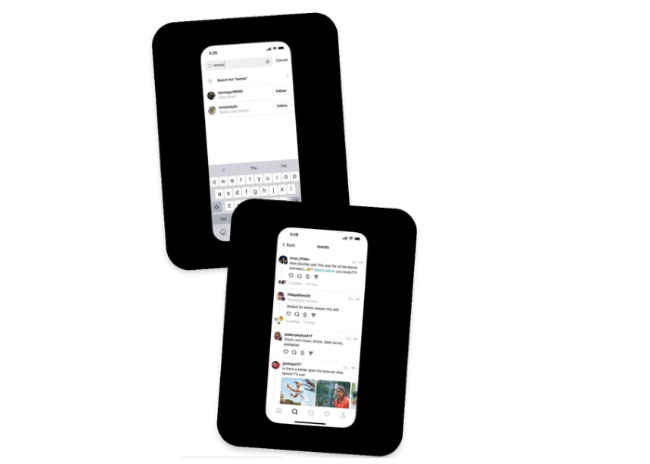
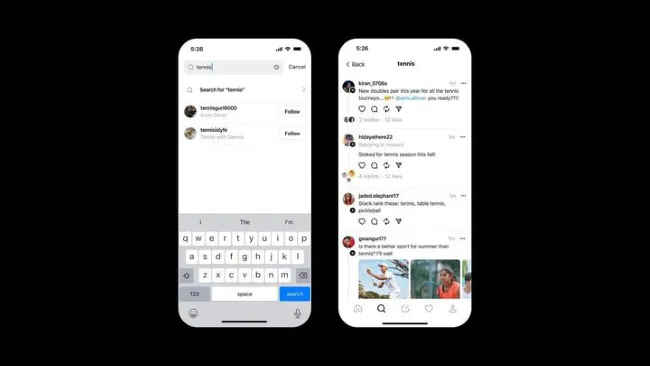
Step 1: Open the Threads app.

Step 2: Tap on the search button which is present at the bottom.

Step 3: Now, type the particular word or sentence that you want to search for, in the search field provided on the top. 

Step 4: Once done, tap the search option, and then you will see all posts containing the searched text.

Since Threads was launched on July 5, the keyword search was among the most requested features by the users. Despite its user drop, the company has been continuously introducing new features in order to gain back users. Last month, Meta Founder and CEO Mark Zuckerberg introduced the feature to directly share a Threads post to Instagram DMs and the ability to add custom alt-text for photo/video. He also introduced a new mention button to easily mention someone's account.


from Mobile Phones News https://ift.tt/GZSaUum

COMMENTS

Name

7,1,Airtel,1,Andriod,1,Android,4,Android Q,1,apex,1,Apple,7,Apps,1,Asus Rog,1,Black Shark 2,2,Boeing 737 MAX,1,Bsnl,2,camera,2,CPU,3,Donald Trump,1,Earphone,1,Facebook,5,Fan,1,Fitbit,1,foldable Phone,2,Fortnite,1,Galaxy A40,1,Galaxy s10,1,Galaxy s10e,1,Games,10,gaming,1,Google,6,Google Pixel 2,1,Honor 10i,1,Huawe,1,Huawei,6,Huawei GT,1,IBM,1,Instagram,2,Internet,2,ios,2,iPad,2,iphone,2,Israel,1,jiomart,1,Laptop,1,Leica Q2,1,M20,1,mac,1,MacOS,1,Mi 9,1,Mi A2,1,Mi LED TV,1,MicroSoft,3,mobile,1,Moon,2,Mozilla,1,Nasa,2,News,1,Nokia,4,Nokia 62,1,Nvidias,1,OnePlus,4,Oppo,5,P30,3,Pixel,1,Poco F1,1,Pubg,12,Qualcomm,2,Redmi 3,1,Redmi 6 Pro,1,Redmi 7,1,Redmi Note 7,1,reliance,1,Reno,1,samsung,11,Skype,1,SmartPhone,56,Social,5,Spotify,1,Tech,35,Telecom,3,Touchpad,1,Tournament,1,TV,1,Twitter,1,Vivo,2,Watch,2,WhatsApp,1,Xbox,1,Xiaomi,16,y9li,1,
ltr
item
Genius Baba: Threads keyword search feature now rolling out in India: Heres how to use it
Threads keyword search feature now rolling out in India: Heres how to use it
https://i.ytimg.com/vi/ZnT2azDpIA0/hqdefault.jpg
https://i.ytimg.com/vi/ZnT2azDpIA0/default.jpg
Genius Baba
https://geniusbabaa.blogspot.com/2023/09/threads-keyword-search-feature-now.html
https://geniusbabaa.blogspot.com/
https://geniusbabaa.blogspot.com/2023/09/threads-keyword-search-feature-now.html
true
7104319406113350277
UTF-8
Loaded All Posts Not found any posts VIEW ALL Readmore Reply Cancel reply Delete By Home PAGES POSTS View All RECOMMENDED FOR YOU LABEL ARCHIVE SEARCH ALL POSTS Not found any post match with your request Back Home Sunday Monday Tuesday Wednesday Thursday Friday Saturday Sun Mon Tue Wed Thu Fri Sat January February March April May June July August September October November December Jan Feb Mar Apr May Jun Jul Aug Sep Oct Nov Dec just now 1 minute ago $$1$$ minutes ago 1 hour ago $$1$$ hours ago Yesterday $$1$$ days ago $$1$$ weeks ago more than 5 weeks ago Followers Follow THIS PREMIUM CONTENT IS LOCKED STEP 1: Share. STEP 2: Click the link you shared to unlock Copy All Code Select All Code All codes were copied to your clipboard Can not copy the codes / texts, please press [CTRL]+[C] (or CMD+C with Mac) to copy